Trimble Installation Manager - Setup Guide
1. Verify if Trimble Installation Manager Is Installed
First, check to see of Trimble Installation Manager (TIM) is already installed.
Look for Trimble Installation Manager in All Apps by first selecting the Windows icon, the scrolling down to the T’s (it may appear at the very top of the list of apps)
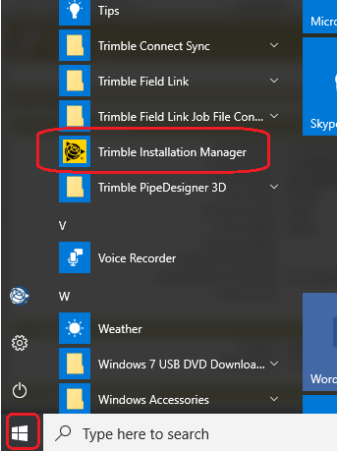
Look for Trimble Installation Manager in All Apps by first selecting the Windows icon, the scrolling down to the T’s (it may appear at the very top of the list of apps)
2. Download Trimble Installation Manager
- If TIM cannot be found, copy and paste this URL into an internet browser http://www.trimble.com/installationmanager or simply type “Trimble Installation Manager” in Google.
- In the Download Trimble Installation Manager box, double click on TIM for Windows – Online.
- Once it has downloaded, open and run the installer file.
3. Install Trimble Installation Manager
- After selecting Open, the Installation Manager Setup Wizard will guide you through the setup process. Begin by selecting Next>.
- Then, Select I Agree, then Next>.
- Leave the default Everyone selected, and select Next>.
- On the Confirm Installation Screen, select Next> to begin the installation.
- On the final screen, Leave Launch Trimble Installation Manager selected, and select Close.
4. Checking PC/Device Serial Number
After installing Trimble Installation Manager, you can launch the program to install a variety of Trimble software solutions. In addition, you can also verify your device serial number, which can be used to assign and transfer software. When asked by BuildingPoint or Trimble support for your device ID or serial, please reference this number.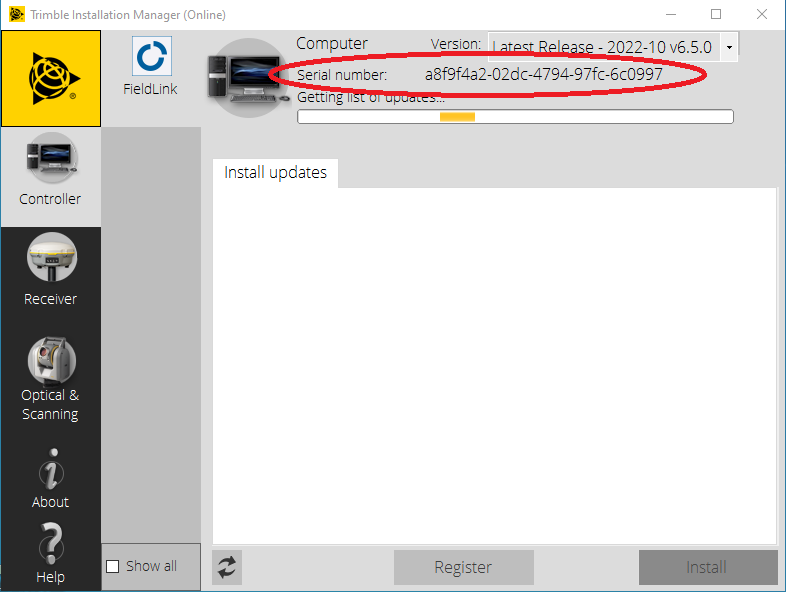
Related Articles
Trimble Fieldpoints - Installation Guide
1. Verify if Trimble Installation Manager (TIM) Is Already Installed? Click on the Windows icon in the lower left hand corner of the screen Scroll down to the 'T's Look for Trimble Installation Manager Option A.) If TIM is not there, follow the guide ...Trimble Ri - Firmware Installation & Compatability
Firmware Installation To install Firmware onto the Ri you will need Trimble Installation Manager installed. If you do not have Trimble installation manager please refer to Trimble Installation Manager - Setup Guide Open Trimble Installation Manager ...Trimble X7/X9 - Firmware Installation & Compatibility
1. Firmware Compatibility With the Trimble X7, it is important to ensure you are using the proper firmware for the version of FieldLink you are using on your tablet. The table below shows the firmware parings for optimal performance. For help on ...Trimble FieldPoints - Migrating Perpetual Installation To Subscription
1. Verify If Reprise License Manager Is Installed To begin, click on the Windows icon in the lower left hand corner of the screen. Windows 10) Scroll down to the 'R's Windows 11) Select ‘All Apps’, then Scroll down to the 'R's Look for Reprise ...Trimble R780 – FieldLink Troubleshooting Guide
This knowledge base article covers common connection and initialization issues when using a Trimble R780 GNSS receiver with Trimble FieldLink, with a focus on situations where the receiver gets stuck on “Initializing”. Common Symptom R780 ...